
Reliant
Reliant Energy Retail Holdings, LLC.Business
4.82.80K Reviews
- Version
- 9.9.0
- Installs
- 500.00K
- Age Rating
- Everyone
Screenshots

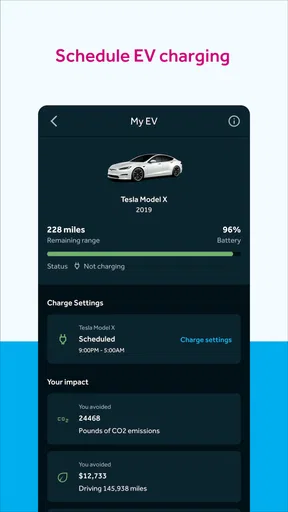
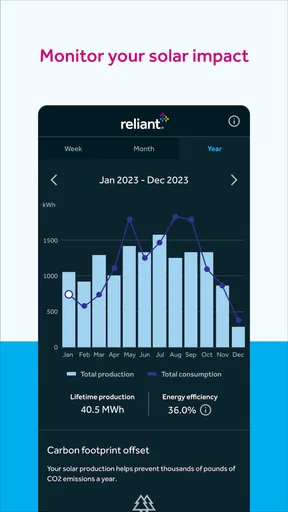

Our Review of Reliant
 Analysis by Appyee
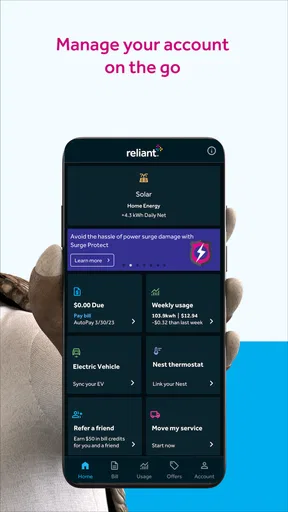
I approached Reliant as a practical account-management app rather than something I would open for entertainment. It belongs to the business category and is developed by Reliant Energy Retail Holdings, LLC., with the simple store summary “Power Your Way.” That description is brief, but it points to the app’s real purpose: giving Reliant customers a mobile place to handle everyday energy-account tasks instead of relying on a browser or a phone call for every small question.
My overall impression is positive, especially for someone who already has a Reliant account and wants a more convenient way to stay on top of it. The app is free, rated for Everyone, and has built a strong user response with a 4.8 average from around 9,000 ratings. It has also passed the half-million-install mark, which makes it feel like an established companion for the company’s customers rather than an experimental side project.
That said, an energy account app is only useful when the basics work at the moment you need them. A login problem before a payment deadline, a screen that does not refresh, or confusion about whether an action went through can quickly overshadow an otherwise clean experience. I found that the most useful way to judge Reliant is not by how polished its opening screen feels, but by how well it supports a short, stressful task when I am busy and need a clear answer.
Where users are most likely to get stuck
The first point of friction is usually not the account itself but the handoff between the app and the customer’s existing Reliant credentials. If you already use Reliant through a website, it is natural to expect the same sign-in details to work immediately on a phone. When that fails, I would first check for ordinary typing issues, such as an extra space, an autofill entry from an old password, or a different email address from the one attached to the account.
This matters because an energy app does not give much room for guesswork. A banking app may show a broad activity feed, while a utility account often asks you to confirm a specific balance, due date, payment status, or service detail. If the sign-in screen loops back without making the problem obvious, I would avoid repeatedly submitting the same details. Instead, I would use the account-recovery route offered on the screen and make sure I am working from the email account or phone information associated with the Reliant account.
Another common sticking point is assuming that a successful payment or account change must appear everywhere instantly. Mobile account tools typically depend on information being retrieved from the provider’s systems. If a screen still shows an earlier balance after an action, that does not automatically mean the action failed. I would look for a confirmation message, note the time of the attempt, and refresh once rather than tapping the same control repeatedly.
The safest habit is to confirm an action before repeating it. This is particularly important with payments. Duplicate attempts can create more confusion than a delayed display, so I would check the app’s confirmation state and, when available, the account activity view before trying again. If the screen remains unclear, I would move to Reliant’s official support channel instead of treating repeated taps as troubleshooting.
Small setup checks that prevent larger problems
Reliant is listed as requiring iOS or Android version 10 or later, so I would check the phone’s operating-system version before trying to diagnose an installation problem. A device that is below that requirement may not install or update normally, and no amount of clearing screens will solve that compatibility issue. I would also leave enough free storage for the update process and install the app through the device’s official app store rather than an unfamiliar download source.
Once installed, I would open the app on a stable connection and allow the initial screens to finish loading. If the app works on Wi-Fi but not on mobile data, the problem may be the phone’s data setting rather than the Reliant account. If it works on mobile data but not on one particular Wi-Fi network, I would test another trusted connection before reinstalling anything.
There is also a useful distinction between an app problem and an account problem. If the app opens but a particular account area will not load, I would sign out only after recording any visible confirmation or reference information. Signing out can remove the context needed to understand what happened. For a simple loading delay, closing and reopening the app is a reasonable first step; for a repeated login failure, account recovery is more appropriate than repeatedly force-closing it.
I would keep the current version in mind as well. Reliant is currently listed at version 9.9.0, so an older installation may behave differently from a recently updated one. Updating is sensible when the store offers it, but I would not update in the middle of an uncertain payment attempt unless I had already confirmed the transaction status. The goal is to preserve a clear record of what I did, not simply to make the app look current.
A sensible routine for everyday account tasks
My preferred workflow begins before I need to do anything urgent. I would open the app when I have a quiet moment, sign in, and identify where the main account information is displayed. That removes the pressure of learning the navigation while a deadline is approaching. I would also check whether the account information shown matches the service account I intended to manage, especially if several people in a household use the same phone.
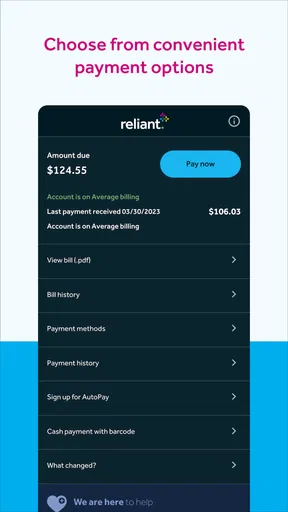
For a routine payment, I would start by checking the displayed balance and due information, then proceed carefully through the payment screen. Before leaving the app, I would look for a clear completion state. A screenshot may be useful for my own records if the app displays a confirmation, but I would avoid capturing sensitive information unnecessarily. The important point is to retain enough detail to distinguish a completed action from an abandoned or interrupted one.
For a quick account check, the app is more convenient than opening a browser, finding the correct Reliant page, and signing in there. This is where a dedicated mobile tool earns its place. I can imagine using it while leaving home, during a lunch break, or when someone in the household asks whether an account task has already been handled. The benefit is not that the app transforms energy management; it reduces the number of steps for a task I already need to complete.
A less obvious advantage is using the app as a verification point rather than merely a payment button. If I receive an email, text, or reminder about the account, I would prefer to open the official app directly instead of following an unexpected message link. That habit helps me compare what the account itself shows with what a notification claims, without making assumptions about the message.
How to recover when a workflow breaks
When a screen freezes or returns an error, I would work from the least disruptive fix to the most disruptive one. First, I would wait briefly and try a single refresh. Next, I would close and reopen the app. Then I would test the connection, checking whether other trusted apps can reach the internet. Only after those steps would I consider signing out, updating, or reinstalling.
Reinstalling can be useful when the local installation is damaged, but it should not be the first response to an account-specific issue. It may remove locally stored session information, leaving me with the original sign-in problem and no better understanding of what happened. Before reinstalling, I would make sure I know the correct login details and have recorded any important confirmation information visible in the app.
If a payment screen appears to fail after submission, I would not immediately submit it again. I would first check the account activity or confirmation area, then check any relevant notification from the payment method. If the status still cannot be understood, contacting Reliant with the approximate time and the action attempted is more reliable than creating a second transaction and hoping one of them settles correctly.
For login trouble, I would separate three possibilities: incorrect credentials, a temporary service issue, and a phone or network issue. Trying the same account through the official Reliant website can help identify the category, but I would use that comparison carefully. If the website works and the app does not, the app installation or session may be at fault. If neither works, the issue is less likely to be specific to the mobile app.
When the app is not the cause
It is easy to blame Reliant when the information on screen is not what I expected, but an account app displays information supplied by the provider’s account systems. A delayed balance, an unavailable section, or a service detail that looks outdated may reflect account processing or a temporary backend issue rather than a failure in the phone application.
This distinction is important for service-related questions. If I am trying to understand an outage, a billing adjustment, or a contract detail, the app may be a convenient place to look, but it is not a substitute for direct support when the account needs explanation. I would use the app to gather the visible facts first, then contact Reliant if the situation requires a decision, correction, or clarification that the screen does not resolve.
The same applies to phone performance. If every app is slow, the device may be low on storage, overloaded, or waiting for a system update. If only Reliant behaves strangely, updating or reinstalling becomes more reasonable. If the issue appears only on one network, I would investigate that network before changing the app. These simple comparisons prevent unnecessary account resets.
Privacy and security also deserve practical attention. I would use a personal device, avoid saving credentials on a shared phone, and sign out when the device is not under my control. Because this is a business app connected to an energy account, I would treat unexpected login prompts and payment requests cautiously. Opening Reliant directly from the installed app is safer than responding impulsively to a message that asks for account action.
Who gets the most value from Reliant?
The best fit is a current Reliant customer who wants a straightforward mobile route to account management. It is especially useful for people who check their account regularly, prefer using a phone to a desktop browser, or want a quick way to verify that an account task has been completed. Households can also benefit when one person is responsible for monitoring the account but is not always near a computer.
I would be more cautious about recommending it to someone who is only comparing energy providers. The app is built around Reliant account use, so it is not a general-purpose energy comparison tool. It also will not replace a conversation with support when the issue involves a complicated billing dispute, a service decision, or details that need personal explanation.
Compared with a normal mobile browser, the dedicated app has the advantage of a focused starting point and a more natural fit for repeated checks. A browser may still be better when I need to manage several unrelated accounts, copy information between pages, or use a larger screen for careful reading. Compared with telephone support, the app is faster for routine actions but less helpful when I need a human explanation. The right choice depends on whether the task is transactional or conversational.
The age rating of Everyone is reassuring for general household use, and the free price removes a financial barrier to trying it. Still, free does not mean universally necessary. If I rarely need to access my account and am happy using the website or contacting support, installing another app may not add much value. Its usefulness grows with frequency: the more often I need a quick account check, the more its convenience matters.
My practical verdict after using it
Reliant succeeds because it focuses on a narrow, useful job: helping customers interact with their Reliant energy account from a phone. I would recommend it to an existing customer who wants fewer browser steps and a convenient place to check account information or handle routine actions. Its 500,000-plus installs and strong 4.8 average suggest that many users find that role worthwhile, while the current 9.9.0 release indicates an actively maintained product line.
My recommendation comes with one condition: treat the app as an account tool, not as an authority that can explain every unusual situation. Confirm important actions, avoid repeating uncertain payments, and distinguish a display delay from a failed transaction. Those habits matter more than quickly reinstalling the app whenever something looks wrong.
In everyday use, I would keep it installed if I were a Reliant customer who regularly checks balances, verifies account activity, or prefers mobile management. I would skip it if I did not have a Reliant account, if I needed broad energy-shopping features, or if most of my questions required a support representative anyway. For the right user, the real strength is dependable access to routine account tasks without turning every check into a full customer-service interaction.
That makes Reliant a practical recommendation rather than an exciting one, and that is appropriate for this category. It does not need to entertain me; it needs to help me complete a small but important household task with as little uncertainty as possible. When the connection, credentials, and account status are all in order, it does that job well.
Verdict
Strengths of Reliant
- Simple interface makes core features easy to find.
- Useful for users who already rely on the Reliant service.
- Account information is available from a mobile device.
- Convenient alternative to handling tasks through a browser.
- Notifications can help users stay updated on important activity.
Limitations of Reliant
- Some features may require an active Reliant account or service plan.
- The app’s usefulness depends heavily on your location and eligibility.
- Certain actions may redirect you to web-based pages.
- Performance can vary on older phones or slower connections.
- Limited appeal for people who do not use Reliant’s services.
Similar Picks in This Category
View All
LinkedIn: Community & Network
LinkedIn3.8

Zoom Workplace
zoom.com4.1

Microsoft Teams
Microsoft Corporation4.6

Meta Business Suite
Meta Platforms, Inc.4.6

Webex Meetings
Cisco Systems, Inc.4.5

TeamViewer Remote Control
TeamViewer4.4
Frequently Asked Questions
What is Reliant and what can I use it for?
Reliant is an app designed to help users manage and access its available services from a mobile device. Depending on the version and region, it may provide account tools, service information, digital resources, notifications, and support options. Before downloading, check the official store description to confirm that the features offered match your needs and are available in your location.
Is Reliant free to download and use?
Reliant can generally be downloaded without an upfront charge, but some services or features may depend on your account, subscription, selected plan, or provider. Additional costs could also come from purchases or services handled outside the app. We recommend reviewing the pricing details, terms of service, and any in-app payment information before creating an account or confirming a transaction.
What devices are compatible with Reliant?
Reliant is intended for mobile devices running a supported version of Android or iOS. Compatibility may vary according to your phone model, operating system version, screen size, and regional store availability. For the smoothest experience, install the latest system updates and download the app only from the official Google Play Store or Apple App Store rather than from unverified websites.
Does Reliant require an account or personal information?
Some Reliant features may be available immediately, while others can require registration or sign-in. Account setup may involve information such as your name, email address, phone number, location, or service details. Before registering, read the app’s privacy policy to understand how data is collected, used, stored, and shared, and avoid entering sensitive information unless it is genuinely required.
Is Reliant safe to download and use?
Reliant should be downloaded from an official app store to reduce the risk of modified or harmful files. As with any application, safety also depends on keeping the app and operating system updated, using a strong password, and checking requested permissions. Review recent user feedback, the developer information, and privacy disclosures before granting access to contacts, location, camera, or other device features.
